🚚 Free Worldwide Shipping on All Orders!Shop Now
\n \n\n\n\n
\n \n
\n
\n

USB Receiver Pairing\n Tutorial:
\n for ProtoArc dual mode mice, keyboards\n and\n combos

\n

\n
\n \n
\n
\n How to re-pair the mouse with the USB dongle:\n

1. For 2.4G mode (ensure the mouse is currently in 2.4G mode):

\n \n How to re-pair the keyboard with the USB dongle:\n

1. For 2.4G mode (ensure the keyboard is currently in 2.4G mode):

\n \n
\n \n
\n \n \n
\n \n\n\n\n","image":["/images/protronics.shop/images/product/sm002-usb-receiver-1.webp"],"sku":"sm002-usb-receiver","brand":{"@type":"Brand","name":"ProtoArc"},"offers":{"@type":"AggregateOffer","lowPrice":2.97,"highPrice":2.97,"priceCurrency":"USD","availability":"https://schema.org/InStock","url":"https://protronics.shop/products/sm002-usb-receiver","offerCount":1}}
HomeStore

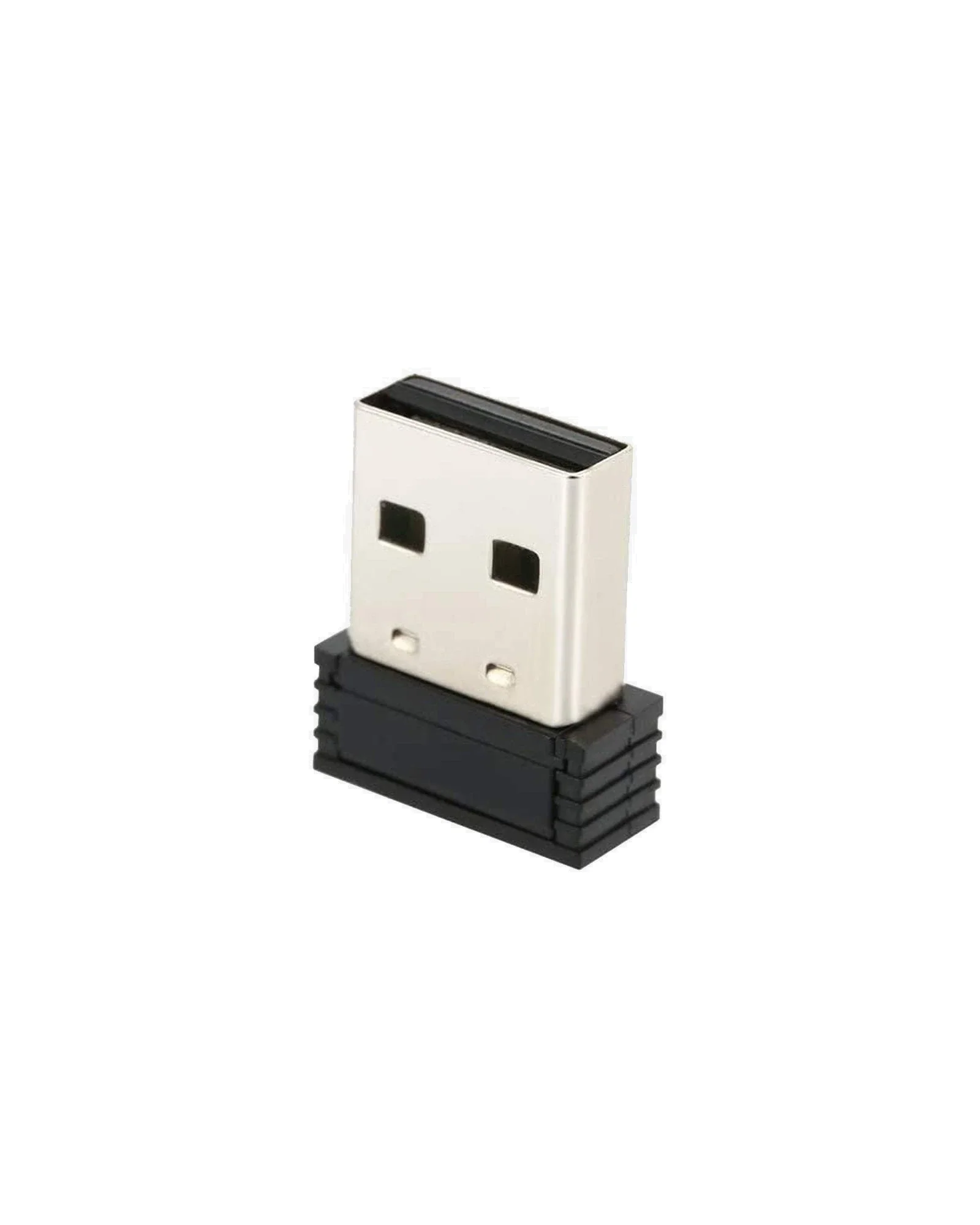
SM002 Unifying USB Receiver

Product image 1

SM002 Unifying USB Receiver


USB Receiver Pairing Tutorial:
for ProtoArc dual mode mice, keyboards and combos

How to re-pair the mouse with the USB dongle:

1. For 2.4G mode (ensure the mouse is currently in 2.4G mode):

  • Press and hold the middle scroll button and the left and right click buttons simultaneously for 5 seconds until the 2.4G indicator light (channel indicator light 1) flashes.
  • Insert the 2.4G USB receiver into your device, and the mouse will connect to your device automatically.
How to re-pair the keyboard with the USB dongle:

1. For 2.4G mode (ensure the keyboard is currently in 2.4G mode):

  • Insert the USB receiver into your device.
  • Turn on the keyboard and press the Esc and + buttons simultaneously for 3 seconds to enter pairing mode. If the USB mode indicator light starts flashing, it means the keyboard has entered pairing mode.
  • Once the keyboard is in pairing mode, quickly unplug and plug in the USB receiver.
  • This will successfully re-pair the keyboard with the USB dongle.

USB Receiver Pairing Tutorial:
for ProtoArc dual mode mice, keyboards and combos

How to re-pair the mouse with the USB dongle:

1. For 2.4G mode (ensure the mouse is currently in 2.4G mode):

  • Press and hold the middle scroll button and the left and right click buttons simultaneously for 5 seconds until the 2.4G indicator light (channel indicator light 1) flashes.
  • Insert the 2.4G USB receiver into your device, and the mouse will connect to your device automatically.
How to re-pair the keyboard with the USB dongle:

1. For 2.4G mode (ensure the keyboard is currently in 2.4G mode):

  • Insert the USB receiver into your device.
  • Turn on the keyboard and press the Esc and + buttons simultaneously for 3 seconds to enter pairing mode. If the USB mode indicator light starts flashing, it means the keyboard has entered pairing mode.
  • Once the keyboard is in pairing mode, quickly unplug and plug in the USB receiver.
  • This will successfully re-pair the keyboard with the USB dongle.
$2.97

Original: $9.90

-70%
SM002 Unifying USB Receiver

$9.90

$2.97

Description


USB Receiver Pairing Tutorial:
for ProtoArc dual mode mice, keyboards and combos

How to re-pair the mouse with the USB dongle:

1. For 2.4G mode (ensure the mouse is currently in 2.4G mode):

  • Press and hold the middle scroll button and the left and right click buttons simultaneously for 5 seconds until the 2.4G indicator light (channel indicator light 1) flashes.
  • Insert the 2.4G USB receiver into your device, and the mouse will connect to your device automatically.
How to re-pair the keyboard with the USB dongle:

1. For 2.4G mode (ensure the keyboard is currently in 2.4G mode):

  • Insert the USB receiver into your device.
  • Turn on the keyboard and press the Esc and + buttons simultaneously for 3 seconds to enter pairing mode. If the USB mode indicator light starts flashing, it means the keyboard has entered pairing mode.
  • Once the keyboard is in pairing mode, quickly unplug and plug in the USB receiver.
  • This will successfully re-pair the keyboard with the USB dongle.